Use case
An alarm app for shift workers and rotating schedules
BarLock gives rotating schedules a firmer wake-up routine by tying dismissal to a scan target outside bed.
For early starts, night-shift recovery, split schedules, and changing wake times.
Why it fits
Make dismissal prove movement.
When wake times move around, the alarm should still end in the same useful place: by the sink, the bag, the kitchen, or the door.
The problem
Waking against your body clock
Shift work means regularly waking at hours your circadian rhythm considers the middle of the night. Sleep pressure is higher, sleep inertia is heavier, and the odds of dismissing an alarm without registering it rise with every rotation. That is exactly the failure mode a tap-to-stop alarm cannot defend against.
BarLock ties dismissal to the route out the door: a bag tag, a lunch box, a bathroom item, a printed code by the exit. Whatever shift comes next, the alarm ends at the same physical checkpoint, which keeps the wake-up procedure identical even when the wake-up time keeps moving.
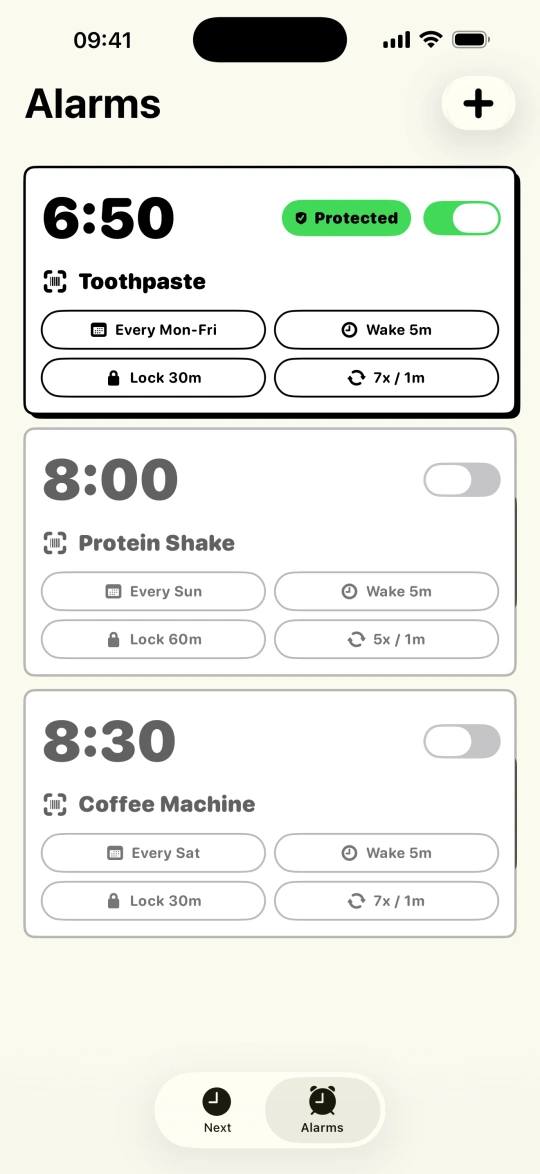
The alarm list is built for rotation. Save a protected alarm per shift pattern, pause the ones that do not apply this week, and bring them back when the schedule flips, so there is no rebuilding alarms at midnight before an early start. After a short turnaround, the Wake-Up Check adds one more confirmation that you are actually up, not just quiet. When the shift starts before dawn, Tiptoe Mode mutes the alarm for a few seconds after Stop so you can get to the scan target while everyone else stays asleep.
Scan targets
Put the checkpoint where the day starts.
Setup flow
Keep the routine short.
- 1Create protected alarms for the shifts that cannot be missed.
- 2Keep scan targets tied to the physical route out of bed.
- 3Pause alarms that do not apply to the current schedule.
- 4Use the Wake-Up Check when the shift starts after irregular sleep.
- 5Use Tiptoe Mode for 4 a.m. starts when the rest of the house is asleep.
Controls
The settings that make it practical.
Saved alarms
Pause control
Backup Alerts
Tiptoe Mode
FAQ
Questions for this routine.
Can BarLock handle rotating shifts?
Yes. You can save different protected alarms and pause the ones that do not apply to the current schedule.
What scan target works for shift work?
Use a target connected to leaving for work, such as a bag tag, lunch item, bathroom item, or printed QR code by the door.
Can BarLock ring again after I stop an alarm?
Yes. Backup Alerts bring the alarm back if dismissal happens before the scan mission is complete.
Related routines
Keep exploring BarLock setups.
Heavy sleepers
A barcode alarm routine for people who can dismiss a normal alarm before they are really awake.
RoutineNo-snooze routines
A stricter alarm flow for people who want the morning to start somewhere other than bed.
FeatureBarcode alarm clock
A focused iOS alarm clock that uses a real barcode or QR scan as the dismissal mission.