Feature
A barcode alarm clock built on iOS 26 system alarms
BarLock is built around iPhone alarm behavior and a real-world scan mission, so dismissal requires more than tapping a button.
For iPhone users who want a stricter alarm without turning the morning into a complicated setup.
Why it fits
Make dismissal prove movement.
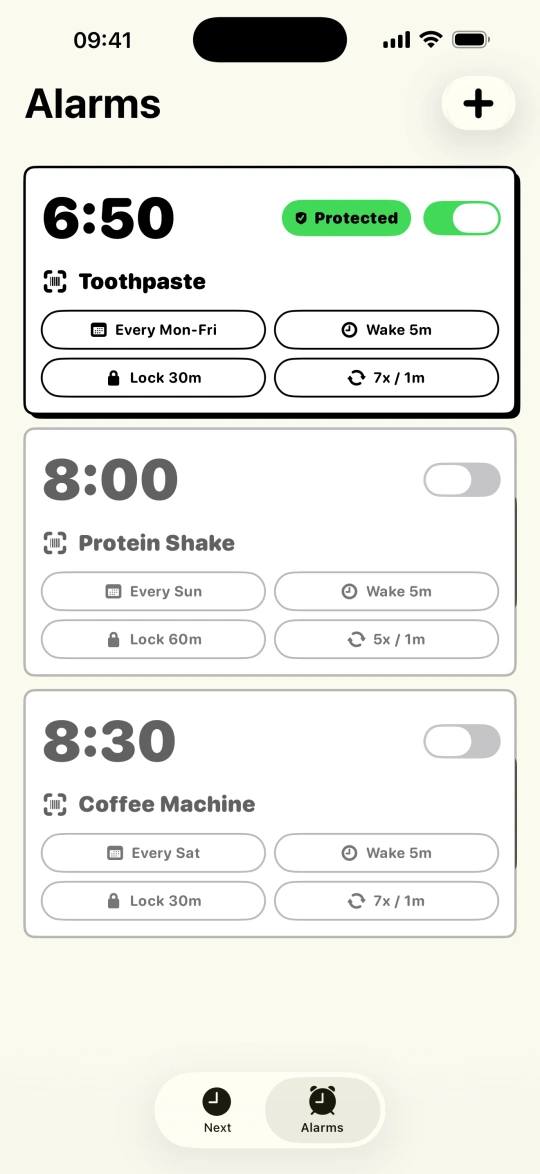
The app keeps the loop narrow: set the alarm, choose the scan target, let iOS ring, scan the item, and confirm you stayed awake if needed.
The problem
System alarms, not background workarounds
The barcode alarm clock idea is not new. What is new is iOS finally providing a real foundation for it. Older camera-alarm apps predate AlarmKit, so they lean on background audio sessions and notification tricks to keep ringing, and the whole mechanic can collapse if the app is force-quit or the phone decides to reclaim memory overnight.
BarLock is built on AlarmKit, the system alarm framework Apple introduced in iOS 26. Protected alarms ring through the system with system reliability, and the app's job starts where the system's ends: opening the scanner and holding the line until the saved barcode or QR code is verified.
Around that core sit the controls that make a barcode alarm clock practical instead of gimmicky: a Lock Window so the mission cannot be quietly edited before it fires, Backup Alerts for early stops, a Wake-Up Check for the minutes after, Tiptoe Mode so the alarm goes quiet after Stop while you reach the code, and repeat schedules so one setup covers the week. No account, no feed, no sleep-content upsell. It is an alarm clock.
Scan targets
Put the checkpoint where the day starts.
Setup flow
Keep the routine short.
- 1Create a protected iPhone alarm.
- 2Save a barcode or QR code as the dismissal mission.
- 3Use repeat days, sounds, and lock controls to match the routine.
- 4Let the Wake-Up Check follow up after the scan when you need it.
Controls
The settings that make it practical.
iOS focus
Barcode mission
Control depth
FAQ
Questions for this routine.
Is BarLock available for iPhone?
Yes. BarLock is an iPhone barcode alarm app available through the App Store.
Does BarLock scan both barcodes and QR codes?
Yes. The alarm mission can use a barcode or QR code.
Why use a barcode alarm on iPhone?
A barcode alarm ties dismissal to a real-world object, which can make the morning routine harder to finish from bed.
Related routines
Keep exploring BarLock setups.
QR code alarm
A QR scan alarm setup for people who want to print their own physical checkpoint.
Use caseHeavy sleepers
A barcode alarm routine for people who can dismiss a normal alarm before they are really awake.
Use caseShift workers
A protected alarm routine for early, late, or rotating shifts on iPhone.